

import matplotlib
if not hasattr(matplotlib.RcParams, "_get"):
matplotlib.RcParams._get = dict.get
2.2.3: Time#
Every agent-based model advances through time, but how it does so is a design choice with real consequences. This section looks at how an ABM chops continuous time into discrete steps (called ticks), what happens inside a single step, and why the order in which agents take their turn can change the outcome of the whole model.
2.2.3.1: Discrete and continuous time#
Time can be represented as continuous or discrete, and the choice determines when the model permits state to change. In continuous time, an event may occur at any real-valued moment; in discrete time, the model groups change into separate intervals. A finer interval can represent faster processes and reduce discretisation artefacts, but it also requires more updates and may imply a precision the available evidence does not support. The time representation should therefore follow both the process being studied and the temporal resolution of the data used to describe it.
Continuous Time: Time flows smoothly, and events or state changes can occur at any precise, real-valued moment.
Discrete Time: Time is broken into distinct, separate intervals, jumping directly from one point to the next.
2.2.3.1.1: Tracking time in ABM#
While reality may be continuous, ABM inherently operates in discrete time. Because a simulation processes its instructions sequentially, time must be discretised into fixed units called ticks. In an ABM, all agent actions and environmental updates are calculated within a single tick before the model advances to the next. Because the computer executes these calculations one agent at a time, the order of agent iteration is critical to simulating real-world parallelism accurately, without introducing processing bias [1]. We return to exactly this point in Section 2.2.3.4, where a simple five-farmer example shows how changing only the order in which agents act changes who ends up with what.
Time can advance in fixed ticks or flow on continuously; the short activity below asks you to tell the two apart.
Whether a model advances in discrete ticks or in continuous, event-driven time is itself a modelling choice, and it should follow the system being represented.
2.2.3.2: Inside a time step#
The following example shows what happens within a single time step, using a wealth-redistribution model in which agents randomly take money from each other:
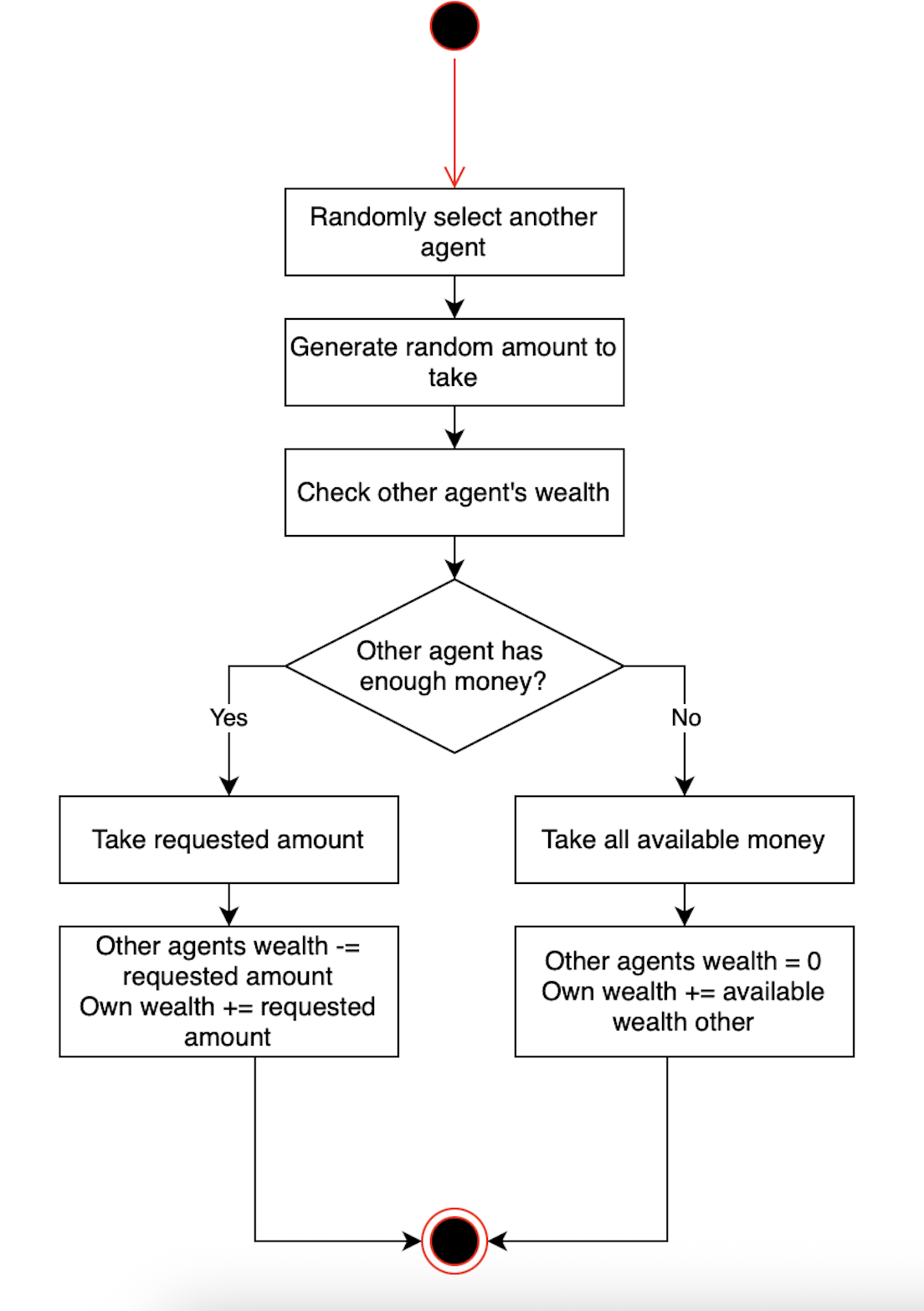
Fig. 20 Figure 2.6 Time Step Flow in a Money Model.#
This diagram illustrates the sequence of actions that occur within a single discrete time step in an agent-based money redistribution model. Each agent follows the same process: (1) randomly selects another agent, (2) decides how much money to attempt to take, (3) checks if the target agent has sufficient funds, and (4) executes the transfer based on availability. This demonstrates how individual agent decisions accumulate into system-level wealth dynamics over multiple time steps.
This flowchart shows the key phases within a single time step:
2.2.3.3: Interactive time stepping#
A time step is easier to understand when the transition can be inspected rather than played as a continuous animation. In the Boids simulation below, each click of “Next Step” advances the model by exactly one tick. Compare the state before and after the click: every bird senses nearby birds, adjusts its direction according to the same local rules, and moves to a new position. No rule specifies the flock’s overall shape, yet repeated local updates make that shape change over time.
Stepping manually is also a verification technique. It lets you check whether agents respond to the information they should have at that moment, whether an update is applied once per tick, and whether an unexpected collective pattern can be traced back to a particular transition. Once those individual transitions make sense, continuous playback simply repeats the same model step faster.
2.2.3.4: Activation order#
A tick defines the interval over which the model advances, but it does not by itself define how the agents share that interval. The activation scheme decides whether agents act from a common state, observe changes made earlier in the same tick, or move through separate decision and update phases. Because that choice can alter both individual opportunities and system-level outcomes, it belongs in the formal model and should be reported with the results.
2.2.3.4.1: Time and activation order#
Inside one time step, a computer still executes instructions in some order. Under sequential activation, an early agent can change the state that later agents observe; under simultaneous or staged activation, agents decide from the same snapshot and changes are committed together. A fixed order may therefore create a systematic first-mover advantage, while random shuffling distributes that advantage across runs but can still produce path-dependent histories. Activation is not merely a programming detail: it is an assumption about information, timing, and whose action can affect whom within the same step.
The first activity isolates the logic: decide which rules are sensitive to ordering and which are not. The next one turns that abstract choice into a distributive consequence by asking who obtains a scarce resource when farmers act in different sequences.
Choose an activation scheme that matches the process being represented, document it, and test whether the conclusions survive a plausible alternative order.
Key takeaways#
Key takeaways
Simulation time may advance in fixed ticks or through events, and that choice must match the system being represented.
Within a tick, agents perceive, decide, act, and update shared state before the model advances.
Activation order is part of the model: a fixed order can create persistent advantage, while reshuffling distributes who acts first.
Interactive stepping is useful for verification because it makes one transition inspectable at a time.
Time settles when agents act and in what order. The remaining question is what happens when they do act on one another, that is, how agents interact. That is the subject of the next section, 2.2.4 Interactions.